
XTB Referral Code: How to Use XTBUK and XTBWELCOME
Which XTB referral code to use depends on where you live: we recommend XTBUK in the United Kingdom, and XTBWELCOME in other countries. This guide shows you which code fits your country, exactly where to enter it when you open your account on the website or in the app, and what to do if something goes wrong.
Which XTB referral code should you use?
XTBUK is for the United Kingdom, and XTBWELCOME covers every other country where XTB accepts clients. Your country of residence decides which code you use. That is the country you select on the registration form when you open your account.
| Where you live | Code to enter |
|---|---|
| United Kingdom | XTBUK |
| EU countries, e.g. Germany, France, Italy, Czech Republic, Slovakia, Austria | XTBWELCOME |
| Middle East, e.g. UAE | XTBWELCOME |
| Latin America, Asia, Africa and other supported countries | XTBWELCOME |
| United States and other countries XTB does not serve | No code available |
How to use the XTB referral code on the website
The code field appears on the very first registration screen, so have the code ready before you start.
- Go to the official XTB website and click Open account (sometimes shown as Create account or Register).
- Choose your country of residence. This decides which XTB company you open the account with, and which code we recommend you use.
- Enter your email address and create a password.
- Find the "Do you have a referral code?" field, which sits just under the email address field.
- Type XTBUK if you selected the United Kingdom, or XTBWELCOME for any other country.
- Click Save next to the code box. Check that the code is still shown before you move on.
- Continue with the registration: personal details, a short questionnaire about your trading experience, and identity verification.
- Once your account is verified, you can fund it and start trading or investing.
How to use the XTB referral code in the mobile app
You can also open your account directly in the XTB app for iPhone or Android. The steps are almost the same.
- Download the official XTB app from the App Store or Google Play and open it.
- Tap Open account (or Create account).
- Select your country of residence and enter your email address.
- Tap "Do you have a referral code?", enter XTBUK or XTBWELCOME, and confirm.
- Finish the registration and verify your identity in the app.
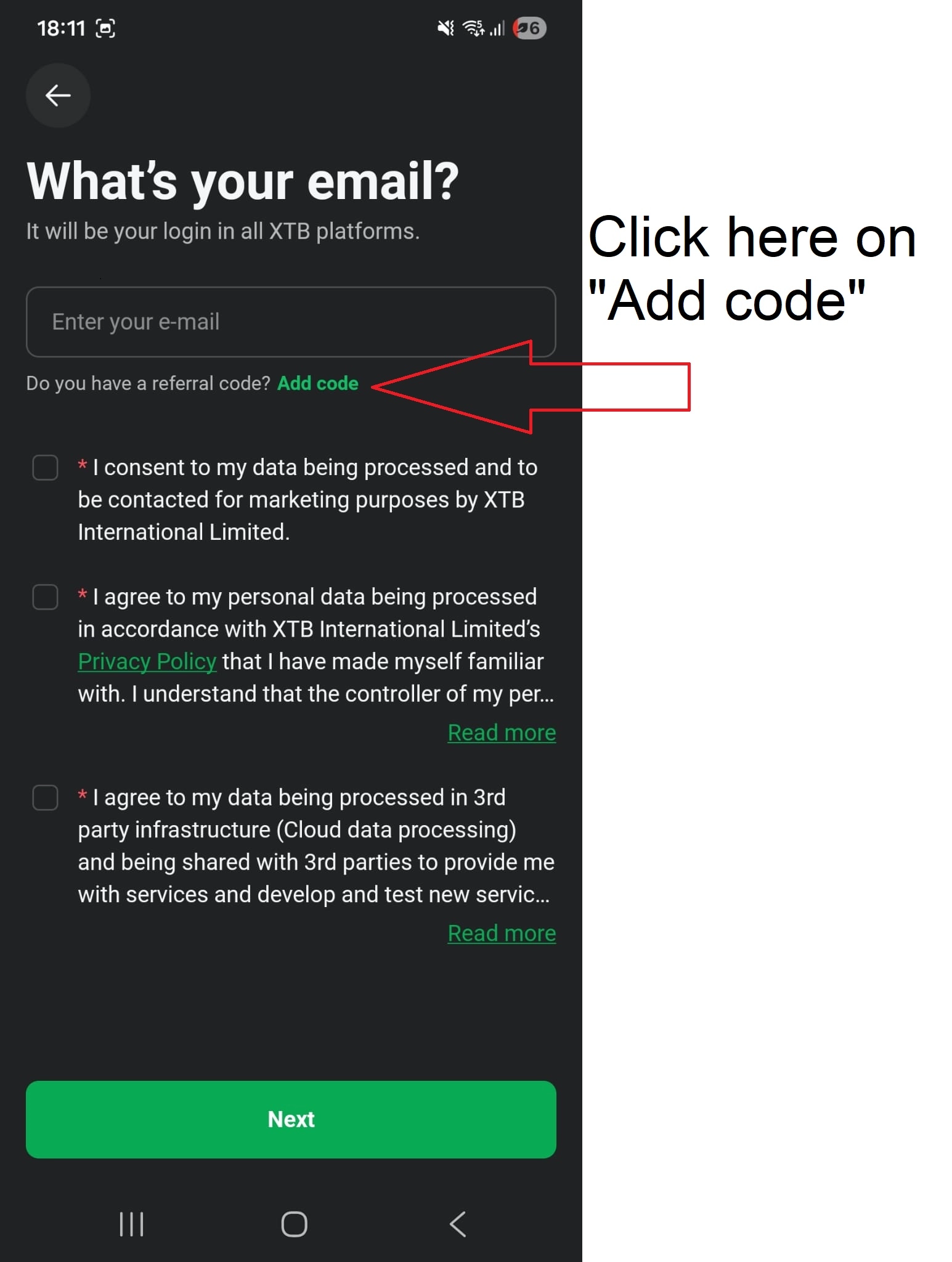
If you started registering on the website, finish on the website. Starting again in the app with the same email can create confusion about which registration the code belongs to.
Tips to make sure your code is applied
- Enter it at the start. The code belongs to the registration step. It is not something you add later in your account settings.
- Type it exactly. Use capital letters and no spaces: XTBUK or XTBWELCOME.
- Click Save. Typing the code without saving it is the most common reason it gets lost.
- Match the code to your country. XTBUK is for UK residents only. Everyone else uses XTBWELCOME.
- Use one code only. Each account can be linked to one referral code.
- No link needed. Typing the code is enough. You do not need to click a special referral link for it to count.
Problems with the code and how to fix them
I cannot see the "Do you have a referral code?" field
It sits right below the email field on the first registration screen. If you have already moved past that screen, go back. On a small phone screen, scroll down a little, as it can be hidden under the keyboard.
The code is not accepted
Check for a typo or an extra space, and make sure the code matches the country you selected. Neither code is case sensitive, so XTBUK and xtbuk work the same way, and so do XTBWELCOME and xtbwelcome. We recommend capital letters for either code. A UK resident is recommended to use XTBUK, and everyone else XTBWELCOME.
I already have an XTB account
Referral codes only work for new accounts, so an existing account cannot be linked to a code.
Current XTB offers for new clients
From time to time XTB runs welcome promotions for new clients, such as a free share in the UK. These usually last a few weeks to a month or two and are often limited to a set number of people.
Whether a referral code is needed depends on the terms of each promotion. Some XTB free share offers are open to new clients who register with a code, while others run through a dedicated campaign link instead. Past UK free share promotions have included shares in Rolls Royce, SoFi and Mercedes.
Always read the terms on the official XTB promotion page before you deposit, as eligibility rules and end dates are set by XTB.
About XTB
XTB is a publicly listed broker founded in 2002 and regulated in several jurisdictions, including by the Financial Conduct Authority in the UK. It offers real stocks and ETFs alongside CFDs on forex, indices, commodities and cryptocurrencies, all on its own xStation platform on web, desktop and mobile. Opening an account is free, and there is no minimum deposit on the standard account.
Frequently asked questions
What is the XTB referral code?
XTBUK if you live in the United Kingdom, and XTBWELCOME if you live in any other country where XTB accepts clients.
Where do I enter the XTB referral code?
On the first registration screen, under the email field. Click "Do you have a referral code?", type the code and click Save.
Is the XTB referral code the same as a promo code or partner code?
Yes. XTB uses one field for referral, promo and partner codes during registration.
Does using the code cost anything or change my fees?
No. Your account, fees and trading conditions are exactly the same as without a code.
Can I add the code after I open my account?
The code is meant to be entered during registration. If you forgot, contact XTB support straight away and ask if it can still be added.
Can I use the code on an existing account?
No. Referral codes are for new accounts only.
Does the code work in the XTB app?
Yes. The same "Do you have a referral code?" option appears when you open an account in the app.
Risk warning: CFDs are complex instruments and come with a high risk of losing money rapidly due to leverage. 69-80% of retail investor accounts lose money when trading CFDs with this provider. You should consider whether you understand how CFDs work and whether you can afford to take the high risk of losing your money.


